ADOBE INDESIGN · LINKED ASSET WORKSPACE

smart relinker

smart relinker

smart relinker

GET ON GUMROAD

More than a relinker. Audit, inspect, preview, replace and reconnect linked assets from one focused workspace.

Aligned capabilities / 04

Complete control over every linked asset.

Complete control over every linked asset.

Complete control over every linked asset.

Smart Relinker Pro combines relinking, linked-asset analysis, batch replacement, previews and prepress checks in one InDesign workspace.

01

Find & Relink

Recover missing assets, refresh modified links, or reconnect a whole document from a folder — including subfolders.

01

Find & Relink

Recover missing assets, refresh modified links, or reconnect a whole document from a folder — including subfolders.

02

Analyze

Inspect status, type, color, effective PPI, page and folder across every linked asset.

02

Analyze

Inspect status, type, color, effective PPI, page and folder across every linked asset.

03

Smart Batch Replace

Replace groups of assets using filename, extension and matching criteria.

03

Smart Batch Replace

Replace groups of assets using filename, extension and matching criteria.

04

Prepress Checks

Find low effective PPI images and unexpected RGB assets before production.

04

Prepress Checks

Find low effective PPI images and unexpected RGB assets before production.

05

Source Folders

See where the document’s linked assets actually live.

05

Source Folders

See where the document’s linked assets actually live.

05

Asset Preview

Inspect a linked file while you work the list.

05

Asset Preview

Inspect a linked file while you work the list.

07

Problem Detection

Surface duplicate names and possible duplicate files before they become mistakes.

07

Problem Detection

Surface duplicate names and possible duplicate files before they become mistakes.

SEE IT IN ACTION

One workspace. Every linked asset under control.

Inspect the document overview, work through individual links and preview every batch replacement before anything changes.

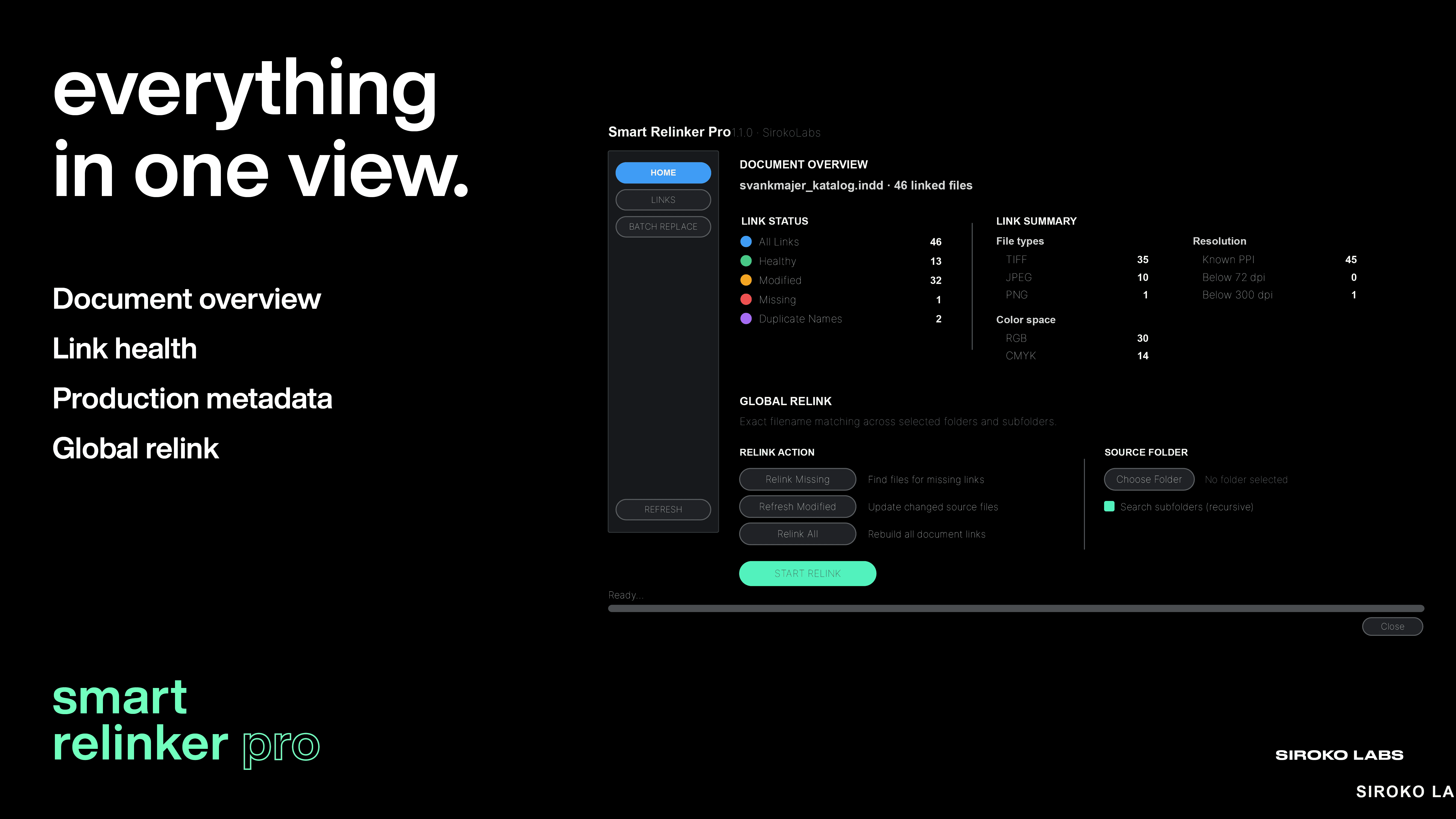
  • DOCUMENT OVERVIEW — Check link health, formats, colour space and effective PPI at a glance.

  • LINK INSPECTION — Filter the complete link list, inspect production metadata and act on individual files.

  • BATCH REPLACE — Combine precise filters, search subfolders and review every match before replacement.

CAPABILITY

LITE

PRO

Find missing links

Relink a complete document from a folder

Search subfolders recursively

Exact filename matching

Skip duplicate filenames safely (unique match only)

Linked-asset overview (status, type, color)

Filters: status, type, color, effective PPI, folder

Page column in the link list

Source-folder list (PATHS)

Low effective PPI check (under 150)

RGB / CMYK / Grayscale detection

Refresh modified links

RGB images filter

Duplicate names

Possible duplicates (same file, different names)

Selected-link preview

Locate / Reveal / Open a link

Smart Batch Replace

Match same basename + new extension

Preview replacements before applying

Replace unique Ready matches only

Only need to recover missing links?

Smart Relinker Lite handles straightforward relinking, including recursive searches through subfolders, and is available free.

DOCS

Installation · Compatibility & Updates · License