INDESIGN · MAC + WINDOWS
Merge Text Frames
Separate frames. One story.
Merge separate text frames into one continuous story while keeping the formatting and control you already have.
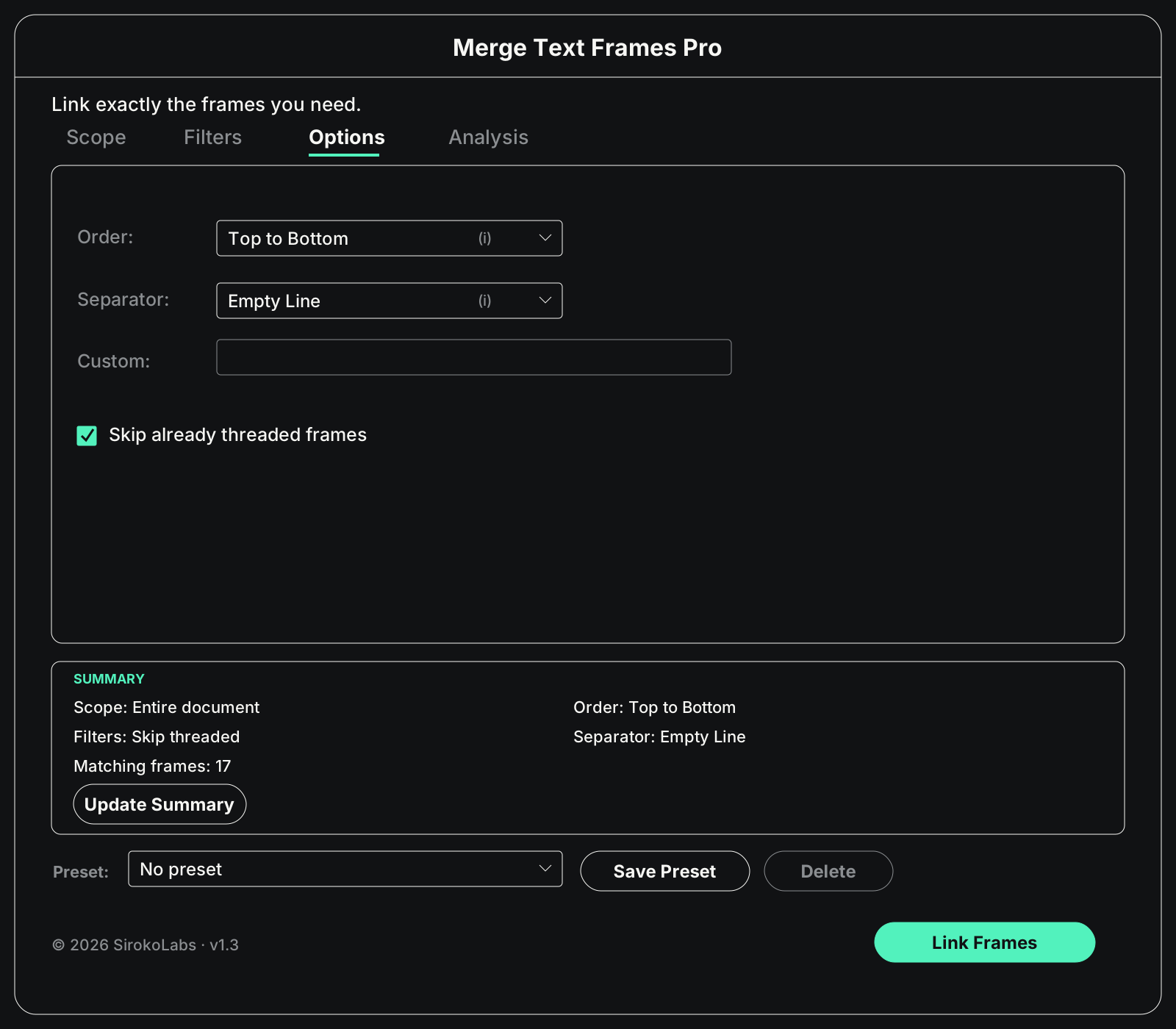
MERGE TEXT FRAMES PRO · AT A GLANCE
Control the merge before you link.
Set the order
Choose exactly how frames become one story.
Preserve formatting
Keep character and paragraph formatting intact.
Merge with control
Scope, filter and review before you merge.
WORKFLOW
From separate frames to one story.
Set the scope, define the order and merge selected frames into one continuous story.
01
Separate frames
02
Set the order
03
Merge
04
One story
MERGE TEXT FRAMES PRO / MATCHING LOGIC
Connect the right frames, not just every frame.
Hover a frame. Matching frames light up and thread together. Width and height show a dimension on the edge.

Scope
Choose selected frames, a page, a range, or the whole document.

Filter exact frames
Match by layer, styles, width, height, or selected size.
Control the sequence
Set order and separators, and skip frames already threaded.

Analyze before merging
Review chains, overset, and locked frames before you link.
MERGE TEXT FRAMES PRO
OPTIONS
Tolerance
1
mm⌄
Adjust the tolerance
Set how closely frame dimensions need to match.
MERGE TEXT FRAMES PRO
UNDO
↶
Undo the last merge
Restore the original frame links in one step.
LITE OR PRO
what you actually get.
lite
PRO
Merge separate frames into one story
Keep existing formatting
Single Undo for the whole operation
Automatic top-to-bottom order
Selected frames or entire document
Protect existing threads and locked frames
Page / page range
—
Filters: layer, object style, paragraph style and size
—
Left-to-right order
—
Separators, custom order and skip threaded
—
Analysis before linking
—
Saved presets
—
INDESIGN · MAC + WINDOWS
merge text frames
Separate frames. One story.
Merge separate text frames into one continuous story while keeping the formatting and control you already have.
MERGE TEXT FRAMES PRO · AT A GLANCE
Control the merge before you link.
Set the order
Choose exactly how frames become one story.
Preserve formatting
Keep character and paragraph formatting intact.
Merge with control
Scope, filter and review before you merge.
WORKFLOW
From separate frames to one story.
Set the scope, define the order and merge selected frames into one continuous story.
01
Separate frames
02
Set the order
03
Merge
04
One story
MERGE TEXT FRAMES PRO / MATCHING LOGIC
Connect the right frames, not just every frame.
Hover a frame. Matching frames light up and thread together. Width and height show a dimension on the edge.
Scope
Choose selected frames, a page, a range, or the whole document.
Filter exact frames
Match by layer, styles, width, height, or selected size.
Control the sequence
Set order and separators, and skip frames already threaded.
Analyze before merging
Review chains, overset, and locked frames before you link.
MERGE TEXT FRAMES PRO
OPTIONS
Tolerance
1
mm⌄
Adjust the tolerance
Set how closely frame dimensions need to match.
MERGE TEXT FRAMES PRO
UNDO
↶
Undo the last merge
Restore the original frame links in one step.
LITE OR PRO
what you actually get.
lite
PRO
Merge separate frames into one story
Keep existing formatting
Single Undo for the whole operation
Automatic top-to-bottom order
Selected frames or entire document
Protect existing threads and locked frames
Page / page range
—
Filters: layer, object style, paragraph style and size
—
Left-to-right order
—
Separators, custom order and skip threaded
—
Analysis before linking
—
Saved presets
—
INDESIGN · MAC + WINDOWS
merge text frames
Separate frames. One story.
Merge separate text frames into one continuous story while keeping the formatting and control you already have.
MERGE TEXT FRAMES PRO · AT A GLANCE
Control the merge before you link.
Set the order
Choose exactly how frames become one story.
Preserve formatting
Keep character and paragraph formatting intact.
Merge with control
Scope, filter and review before you merge.
WORKFLOW
From separate frames to one story.
Set the scope, define the order and merge selected frames into one continuous story.
01
Separate frames
02
Set the order
03
Merge
04
One story
MERGE TEXT FRAMES PRO / MATCHING LOGIC
Connect the right frames, not just every frame.
Hover a frame. Matching frames light up and thread together. Width and height show a dimension on the edge.
Scope
Choose selected frames, a page, a range, or the whole document.
Filter exact frames
Match by layer, styles, width, height, or selected size.
Control the sequence
Set order and separators, and skip frames already threaded.
Analyze before merging
Review chains, overset, and locked frames before you link.
MERGE TEXT FRAMES PRO
OPTIONS
Tolerance
1
mm⌄
Adjust the tolerance
Set how closely frame dimensions need to match.
MERGE TEXT FRAMES PRO
UNDO
↶
Undo the last merge
Restore the original frame links in one step.
LITE OR PRO
what you actually get.
lite
PRO
Merge separate frames into one story
Keep existing formatting
Single Undo for the whole operation
Automatic top-to-bottom order
Selected frames or entire document
Protect existing threads and locked frames
Page / page range
—
Filters: layer, object style, paragraph style and size
—
Left-to-right order
—
Separators, custom order and skip threaded
—
Analysis before linking
—
Saved presets
—